 Search Tips
Dynamic Pricing
Dynamic pricing allows merchants to automatically adjust prices in real-time based on factors like demand, time of day, and customer behavior. By setting minimum and maximum price ranges, merchants can optimize revenue while maintaining competitive pricing for subscription services, live-streamed content, and many other types of products. The system automatically adjusts prices within this specified range to match market conditions and customer expectations.
This guide shows how to set up dynamic pricing, explaining its key benefits, real-world applications, and step-by-step setup instructions.
Benefits
| Benefit | Description | Example |
|---|---|---|
| Reduces Need for Multiple Price Points |
Allows use of price ranges instead of creating multiple static price points. |
A membership site adjusts subscription prices between $15 and $40/month based on demand. |
| Enhances Flexibility | Supports time-based or usage-based services with variable pricing. |
Charges $2/min during peak evening hours (8–11 PM) and $1.50/min during off-peak daytime hours. |
| Streamlines Transactions | Maintains pricing consistency across multiple items and channels to simplify multi-item checkout. | A customer’s cart automatically applies a 20% discount to a bundle of three archived videos, syncing prices across website and mobile app. |
| Ensures Accurate Pricing | Integrates with shopping cart plugins for real-time pricing updates. | A WooCommerce adult platform uses rules to apply real-time discounts to "weekend passes" without manual price updates |
Use Cases
Dynamic pricing is ideal for services like live streaming and cam sessions. It enables real-time price adjustment based on audience, region, and performer popularity.
| Use Case | Description | Example |
|---|---|---|
| Peak Demand Periods | Adjust prices during high-traffic periods (e.g., evenings, weekends, and holidays). | Increase token prices by 20% during evening peak hours (8 PM - 12 AM). |
| Multi-Performer Token Systems | Simplify transactions for customers purchasing tokens usable across multiple performers. | Offer bulk token discounts (e.g., 100 tokens for $90 instead of $100) to incentivize larger purchases while dynamically adjusting bundle prices based on performer popularity. |
| Service-Based Pricing Models | Variable pricing for time or usage-based content (e.g., per-minute video chats, pay-per-view). | Lower per-minute rates for new performers to attract viewers, then gradually increase prices as their follower base grows. |
| Regional or Demographic Targeting | Tailor pricing to customer spending power based on region or demographics. | Offer discounts in lower-income regions; maintain standard prices elsewhere. |
| Manage Booking Volume | Manage booking volume by adjusting prices for high-demand performers or virtual events. | Raise prices for high-demand performers; discount less popular ones to increase traffic. |
-
Fixed-price products (e.g., static token packs).
-
Merchants operating strictly on static pricing models.
Setting Up Dynamic Pricing
Step 1: Obtain SRS Credentials
Contact Segpay Technical Support if you don't have an SRS username and password. These are required to generate the Dynamic Pricing ID, which you'll need to create the join link.
Step 2: Create a Dynamic Price Point
-
Log into the Merchant Portal: https://mp.segpay.com/
-
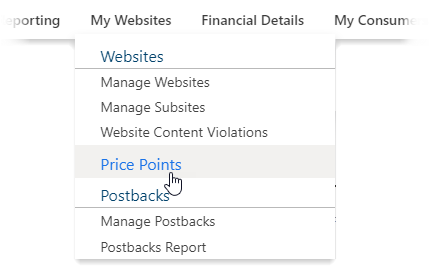
Navigate to My Websites > Price Points.
-
Click Add Price Point.

-
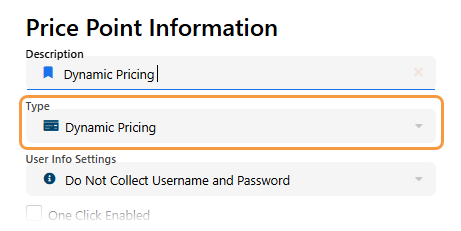
Choose Dynamic Pricing as the price point type (see Manage Price Points for more information).
-
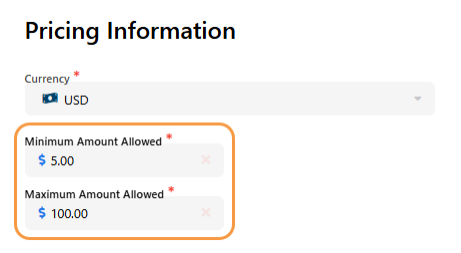
Set the minimum and maximum price range within your account’s limits.
-
Save your settings.
Step 3: Add Price Point to Package & Copy Join Link
To display a payment page with dynamic pricing, add your dynamic price point to a package and then copy the package's join link. This link is essential for generating the dynamic pricing payment page. Note that the page won't display properly until you add the required parameters - these are covered in the API integration section.
-
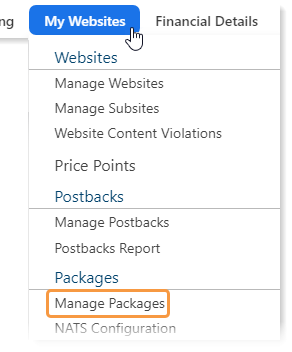
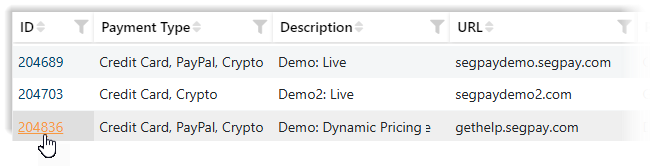
Navigate to My Websites > Manage Packages.
-
Select an existing package or create a new one.
-
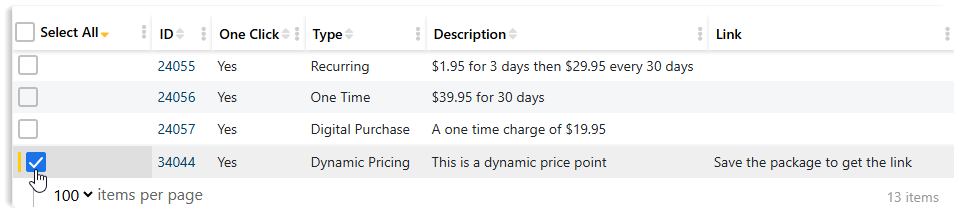
Click the Pricing tab.

-
Select the Dynamic Price Point you created (only one dynamic price point allowed per package).
-
Click Save.
-
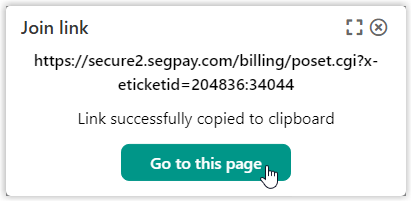
Click Get My Button Code.

-
Click Go to this page and copy the URL from the browser's address bar.
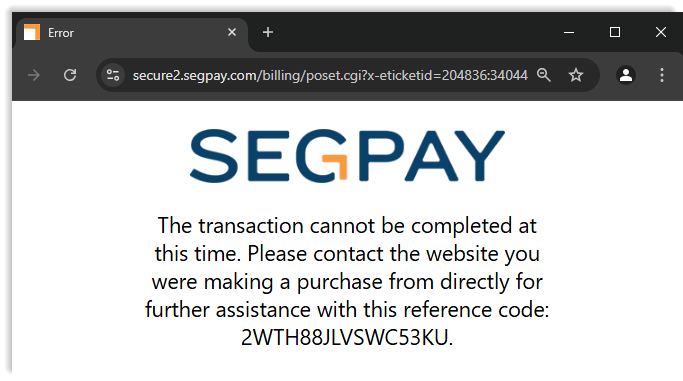
Note that the payment page does not display correctly. This is because must add the required parameters to the join link, as described in the next section, "API Integration for Dynamic Pricing."
API Integration for Dynamic Pricing
This section covers the technical aspects of integrating dynamic pricing via API, including authentication, request formats, and debugging procedures. For production use, merchants must automate the Dynamic Pricing ID generation through API calls from their backend systems. Developers will find essential implementation details and requirements here for properly displaying the dynamic pricing payment page.
Authentication
The Segpay API uses Basic Authentication with your SRS username and access key.
Generate Dynamic Pricing ID
Example API Call
curl -u 'YourSRSUserID:YourSRSAccessKey' \
'https://srs.segpay.com/MerchantServices/DynamicPricing/?merchantId=YourMerchantID&amount=75.00'- Endpoint:
https://srs.segpay.com/MerchantServices/DyanmicPricing/ merchantId: Replace with your Segpay Merchant ID-
amount: Desired price within the approved range
Construct the Join Link
Include the following parameters in the URL:
dynamicpricingid: Encrypted hash from API response.-
dynamicdesc: URL-encoded description of the transaction that appears on email receipts
Example Join Link
https://secure2.segpay.com/billing/poset.cgi?x-eticketid=xxxxxx:xxxxx&dynamicpricingid=e6e104e1-01e4-49f8-b64a-c4bb591223dd&dynamicdesc=Video+Bundle
Troubleshooting
| Issue | Cause | Solution |
|---|---|---|
401 Unauthorized
|
Invalid API credentials | Confirm SRS username and key are correct. |
400 Bad Request
|
Amount is out of approved range | Check and adjust the transaction amount. |
Error page on Join Link
|
Missing dynamicpricingid or price point amount exceeds approved range |
Ensure the ID is present and the amount is within range. |
Transaction Rejected
|
Price exceeds allowed limits | Adjust to stay within the approved price range. |
Additional Resources