 Search Tips
Payment Type Approval Rates report
See your transaction approval and decline rates by payment type for any date range.
The report counts declines with the same website, date, and consumer email address as one decline, so a consumer's retries don't inflate your decline rate. See How approval rates are calculated.
Run the report
-
Log in to the Merchant Portal at https://mp.segpay.com/.
-
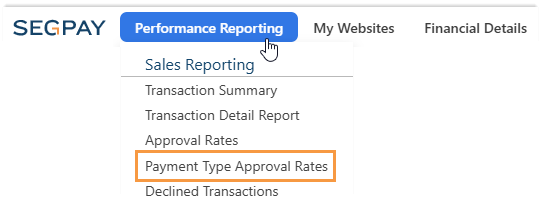
Go to Performance Reporting > Payment Type Approval Rates.
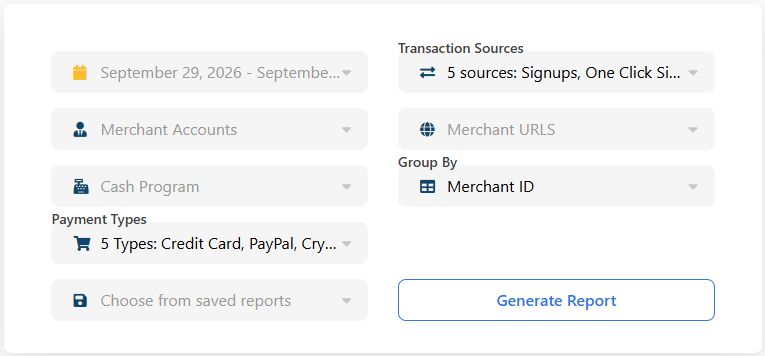
The report page opens with the filters at the top.
-
Select a date range. The report defaults to today.
-
From Merchant Accounts, select the accounts to include.
-
Optional: Change the other filters. For each filter's options and default, see Report filters.
-
Optional: From Group By, select how to group the results. The default is Merchant ID. See Grouping options.
-
Click Generate Report.
To reuse filter selections you saved earlier, select them from Choose from saved reports.
Report filters
Use the filters to choose which transactions the report includes. If you don't change a filter, the report uses the default shown in the table.
| Filter | Description | Default |
|---|---|---|
| Date range | The period the report covers. Choose a preset (Today, Yesterday, This Week, Last 7 Days, This Month, Last Month, Last 30 Days), or select start and end dates on the calendar and click Apply. | Today |
| Merchant Accounts | The merchant accounts to include. | None selected |
| Cash Program | The cash programs to include, if any. | None selected or no options available (if you have no cash programs). |
| Payment Types | The payment types to include: Credit Card, PayPal, Crypto, Bank Transfer, Real Time Payment. Real Time Payment includes Pay by Bank transactions. | All |
| Transaction Sources | The transaction types to include. See Transaction sources. | All |
| URLs | The websites to include, from the accounts you selected. | All URLs for the selected accounts |
Transaction sources
Transaction sources describe the type of each transaction, from an initial signup to a recurring rebill. By default, the report includes all of them.
| Source | Description |
|---|---|
| Signups | An initial purchase where a new consumer starts a subscription, joins a website, or buys access. |
| One Click Signups | A new membership or recurring subscription registration that is completed using a consumer's stored payment details. |
| One Click | A purchase made using a consumer's stored payment details with a single click, without re-entering billing information. |
| Conversion | A trial or promotional membership converting into a paid, full recurring subscription. |
| Rebill | An automated recurring subscription renewal charge processed on an active membership according to its billing terms. |
Grouping options
Use Group By to choose how the report groups its rows. You can select one option at a time, and the default is Merchant ID.
| Option | Groups rows by |
|---|---|
| Merchant ID | Merchant account. |
| URL | Website. |
| Cash Program | Cash or affiliate program. |
| Customer Country | Country from the consumer's billing address. |
| IP Country | Country of the IP address used for the transaction. If that country isn't available, the report uses the billing country. |
| Package ID | Package. |
| Merchant Partner ID | Affiliate ID passed to Segpay with the transaction. |
| Price Point ID | Price point. |
Report columns
Each row covers one day for one payment type and card type. The last row shows totals for the report, with rates calculated from those totals.
| Column | Description |
|---|---|
| Merchant Id | Merchant account ID. |
| Payment Type | Payment type, such as Credit Card or PayPal. |
| Card Type | Card brand, such as Visa or Mastercard. For PayPal, it shows PayPal. |
| Date | Date of the transactions. |
| Raw Attempts | All transactions, approved and declined. |
| Unique Attempts | Approvals plus unique declines. |
| Approvals | Approved transactions, not including voided approvals. A void cancels a sale before the funds are collected. |
| Approval Rate | Approvals divided by unique attempts. |
| Raw Declines | All declined transactions. |
| Unique Declines | Declines with the same website, date, and consumer email address count as one. |
| Decline Rate | Unique declines divided by unique attempts. |
|
Bank Declines |
Unique declines returned by the consumer's bank. |
| Bank Decline Rate | Bank declines divided by unique attempts. |
How approval rates are calculated
A consumer whose payment is declined may try again several times. To keep those retries from inflating your decline rate, the report calculates rates from unique attempts instead of every attempt.
For example, a consumer's payment is declined 3 times and then approved on the same website, on the same date, with the same email address. The report counts:
| Column | Value | Why |
|---|---|---|
| Raw Attempts | 4 | Every attempt counts. |
| Unique Attempts | 2 | 1 approval plus 1 unique decline. |
| Approvals | 1 | The final attempt was approved. |
| Approval Rate | 50% | 1 approval divided by 2 unique attempts. |
| Raw Declines | 3 | Every decline is counted. |
| Unique Declines | 1 | All 3 declines have the same website, date, and email address. |
| Decline Rate | 50% | 1 unique decline divided by 2 unique attempts. |
See also
-
To see each declined transaction and the reason it was declined, see the Declined Transactions report.
-
To review individual approved and declined transactions, filtered by payment type, see the Transaction Detail report.
-
For the decline and error messages consumers see on the pay page, see Pay Page Errors.
-
For how voids, failed rebills, and fraud-related declines work, see the Transactions section of the Merchant Portal and Platform Basics FAQ.