Search Tips
Pay by Bank payments
Learn how to enable and configure Pay by Bank as a payment option on your Segpay payment pages for consumers in the UK and supported EU countries.
Overview
Pay by Bank is an open banking payment method powered by TrueLayer that lets consumers in the UK and supported EU countries pay directly from their bank account using real-time bank transfers. Payments typically settle within seconds. Transactions have a low risk of fraud because consumers approve each payment with their bank, and they aren’t subject to chargebacks or revokes. Pay by Bank runs on the Faster Payments network in the UK and the SEPA Instant Credit Transfer network in the EU.
Payment method properties
| Property | Details |
|---|---|
| Payment Type | Real-time payments |
| Currencies Supported | GBP, EUR |
| Consumer Locations | Belgium, Finland, France, Germany, Ireland, Netherlands, Spain, United Kingdom |
| Merchant-Supported Countries | Available to merchants in Segpay-supported regions |
| Refunds | Supported |
| Supported Billing Models | One-Time, Digital Purchase, Dynamic Pricing |
Before you begin
Before you can accept Pay by Bank payments, the following must be in place:
-
Enable Pay by Bank on your merchant account. Contact your Account Manager to request activation for Pay by Bank (UK), Pay by Bank (EU), or both.
-
Complete the Pay by Bank Service Addendum. Sign the addendum in the Document Signing section of the Merchant Portal.
-
Enable Pay by Bank on at least one package. See Enable Pay by Bank on a package below.
Limitations
Pay by Bank has the following limitations:
-
No recurring payments. Pay by Bank is not available for recurring payment sign-ups. Consumers signing up for a recurring plan will not see Pay by Bank as a payment option and will need to use another available payment method.
-
UK or supported EU bank account required. Consumers can be located anywhere, but they must pay from a bank account in the UK or a supported EU country.
-
No cross-sells. Cross-sell options aren't displayed when a consumer selects Pay by Bank. They appear again if the consumer switches to a payment method that supports cross-sells.
-
No One-Click Service. Pay by Bank doesn't support the One-Click Service. One-click payments through the hosted pay page work, but the consumer is still redirected to their bank to complete the payment.
Accept Pay by Bank payments
After Segpay enables your merchant account for Pay by Bank, you can configure your existing payment packages to accept Pay by Bank payments.
Enable Pay by Bank on a package
-
Log in to the Segpay Merchant Portal at https://mp.segpay.com/.
-
Go to My Websites > Manage Packages.
-
Find the package you want to enable for Pay by Bank and click the package ID or Edit.

-
Click the Package tab. If your package includes price points in currencies other than GBP or EUR, select Use Geo IP from the MultiCurrency Options drop-down menu. This setting detects the consumer's location from their IP address and sets the pay page currency to match, so prices appear in their local currency, such as GBP in the UK or EUR in Germany.
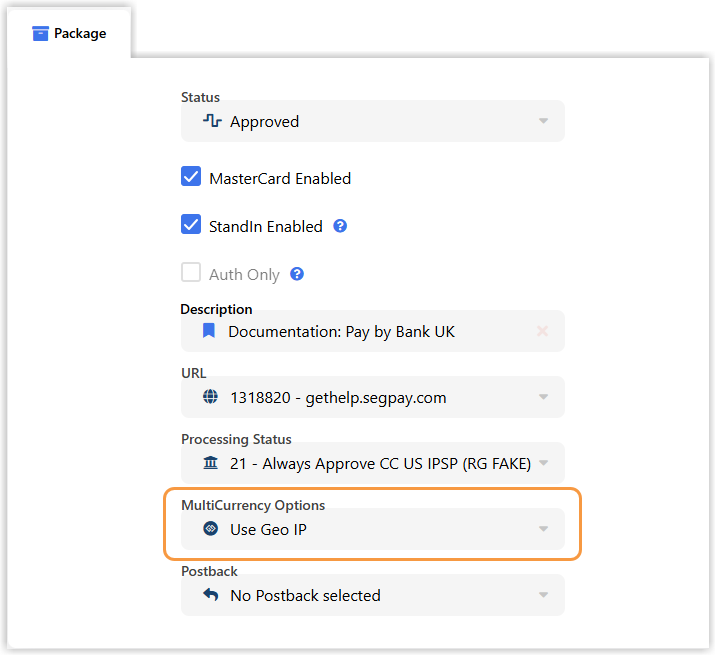
Pay by Bank payments are always completed in GBP or EUR. If your package uses price points in other currencies, Pay by Bank works only when Use Geo IP is selected, and prices are converted automatically at checkout.
-
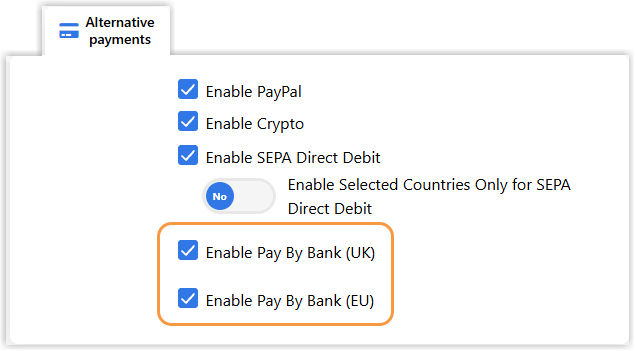
Click the Alternative Payments tab and select Enable Pay by Bank (UK), Enable Pay by Bank (EU), or both, depending on which regions you want to support.
-
Click Save to apply changes.
Simplify the checkout experience
This configuration is optional. A join link is the URL of your Segpay pay page for a specific package and price point. Pay by Bank appears on your pay page only when the United Kingdom or a supported EU country is selected. If the currency isn't GBP or EUR, the pay page switches it automatically when the consumer selects Pay by Bank. You can simplify the checkout experience by adding join link parameters that set these values in advance.
Join link parameters
Add these three parameters to your join link to show Pay by Bank as the only payment option and preselect the country and currency. This reduces the steps a consumer takes on the pay page.
| Parameter | Value | Description |
|---|---|---|
allowedpaymenttypes
|
pbbi
|
Shows only Pay by Bank on the pay page. To show other payment types too, see Display additional payment types below. |
dmcurrency
|
GBP or EUR |
Sets the default currency to GBP or EUR. |
x-billcntry
|
Country code | Sets the default country. See the country values below. |
Country values
Use these values for each supported country:
| Country | x-billcntry
|
dmcurrency
|
|---|---|---|
| Belgium | BE
|
EUR
|
| Finland | FI
|
EUR
|
| France | FR
|
EUR
|
| Germany | DE
|
EUR
|
| Ireland | IE
|
EUR
|
| Netherlands | NL
|
EUR
|
| Spain | ES
|
EUR
|
| United Kingdom | GB
|
GBP
|
Add parameters to the join link
The steps below provide an example configuration for UK consumers. For other countries, use the x-billcntry and dmcurrency values from the table above.
-
Go to My Websites > Manage Packages.
-
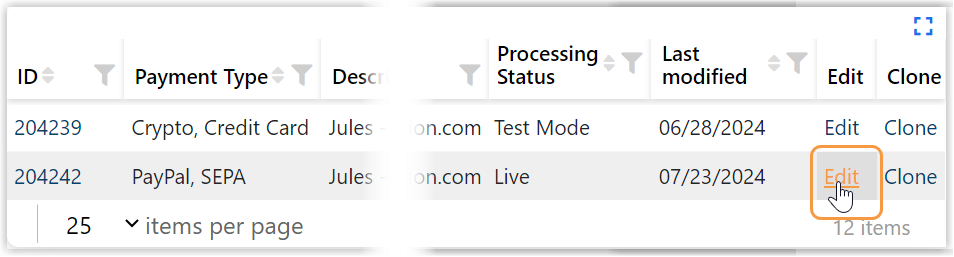
Click Edit for the relevant package.
-
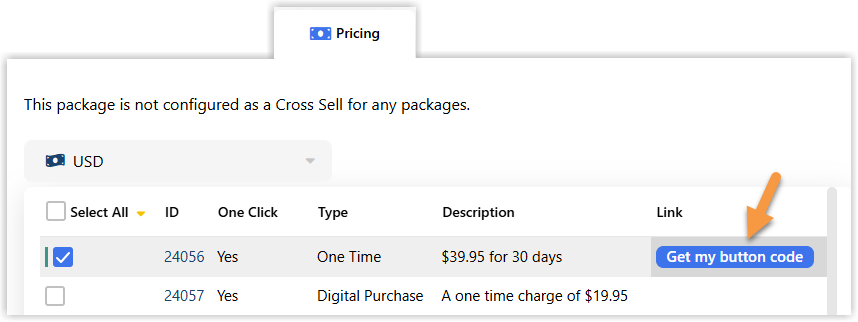
Go to the Pricing tab and click Get my button code for the relevant price point.
-
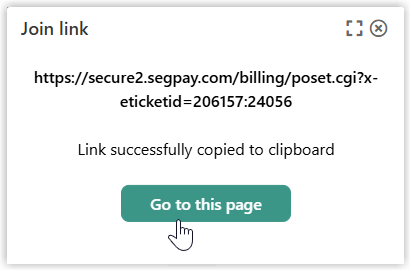
Click Go to this page to open the join link in your browser.
-
Append the parameters to your join link using this format:
&allowedpaymenttypes=pbbi&dmcurrency=GBP&x-billcntry=GB
Display additional payment types
If you want to display additional payment types alongside Pay by Bank, add them to the allowedpaymenttypes parameter as a comma-separated list. Only payment types included in the list will appear as an option on your pay page, regardless of your package configuration. The first payment type in the list is selected by default.
| Payment Type | Value |
|---|---|
| Pay by Bank | pbbi
|
| Credit card | cc
|
| PayPal | pp
|
| Crypto | cryp
|
Each payment type must be enabled on your package before it will appear on your pay page, even if it is included in the allowedpaymenttypes parameter.
https://secure2.segpay.com/billing/poset.cgi?x-eticketid=xxxxxx:xxxxx&allowedpaymenttypes=pbbi,pp,cc,cryp&dmcurrency=GBP&x-billcntry=GBReporting
The Merchant Portal indicates when a transaction was made with Pay by Bank. You can view Pay by Bank transaction data in the following reports:
-
Daily Revenue
-
Detail Ledger
-
Invoice
-
Payment Type Approval Rates
-
Sales by Country
-
Statement
-
Transaction Detail
-
Transaction Summary
Searching for transactions
-
Log in to the Merchant Portal at https://mp.segpay.com/.
-
Go to My Consumers > Manage Consumers.
-
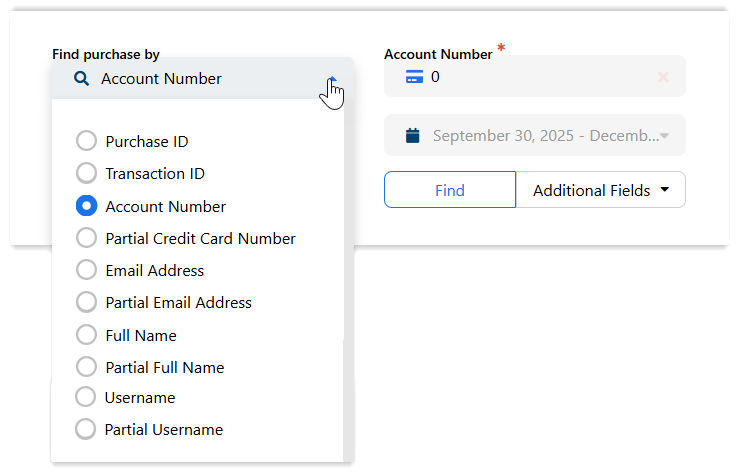
Click the Find purchase by menu, select your search criteria, enter the search information, and click Find.
Generating reports
-
Go to Performance Reporting in the Merchant Portal.
-
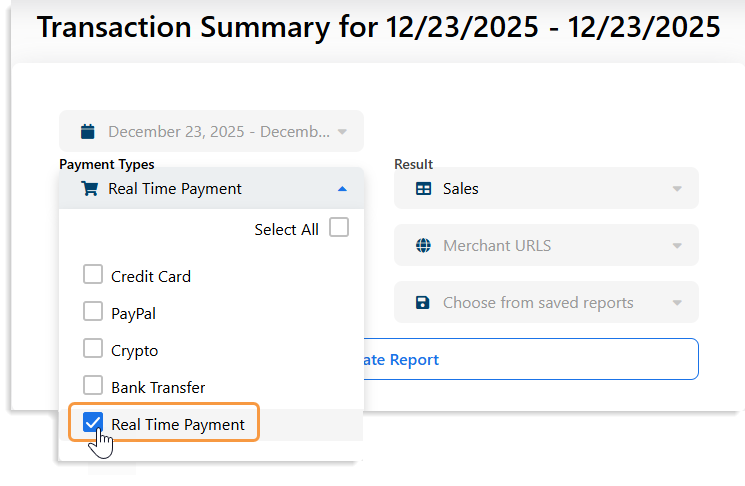
Select Real Time Payment from the Payment Type filter to view Pay by Bank transactions.
Viewing processing fees
-
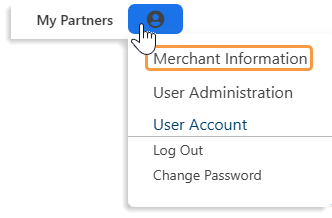
Go to Merchant Information.
-
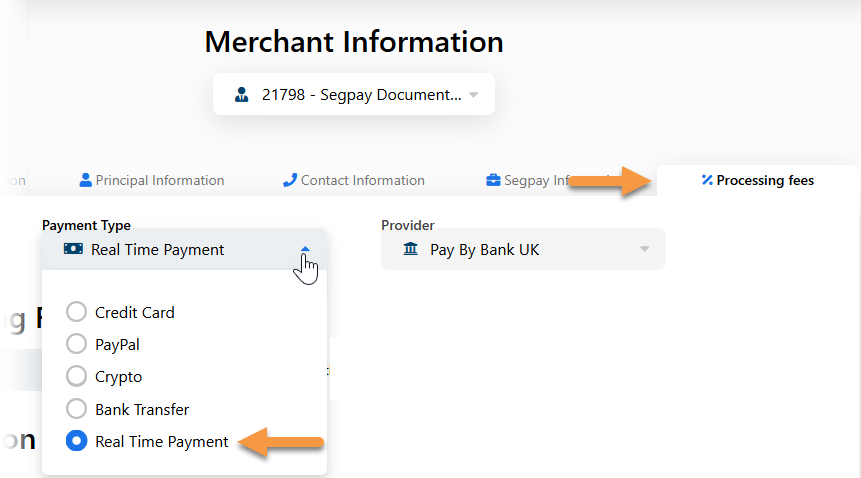
Click the Processing fees tab.
-
Select Real Time Payment from the Payment Type menu.
Consumer experience
If Pay by Bank is enabled for your payment packages, consumers see it as a payment option whenever the United Kingdom or a supported EU country is selected on your pay page. The pay page sets the default country based on the consumer's IP address, and consumers can change it.
Payment flow
To pay with Pay by Bank, a consumer completes the following steps:
-
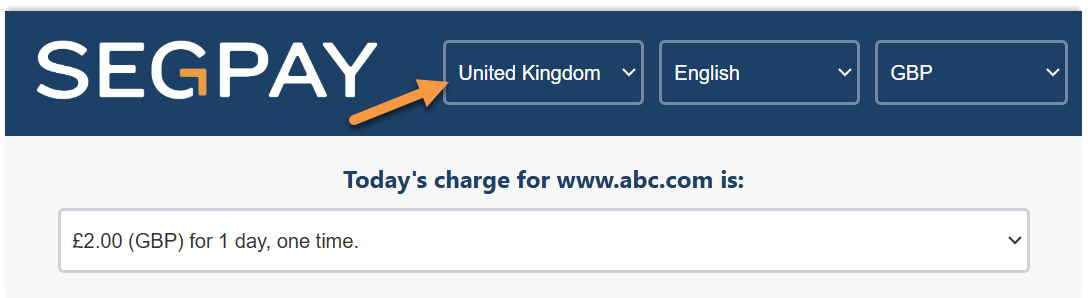
Selects the United Kingdom or a supported EU country from the Country drop-down menu, if it isn't already selected.
If you include
x-billcntryin your join link, the country is preselected. See the country values for supported codes. -
Selects the Pay by Bank tab on the pay page.

If the currency isn't GBP or EUR when the consumer selects Pay by Bank, the pay page switches it automatically to match the selected country and shows a message about the change. If you include
dmcurrencyin your join link, the currency is already set and the consumer doesn't see this message. -
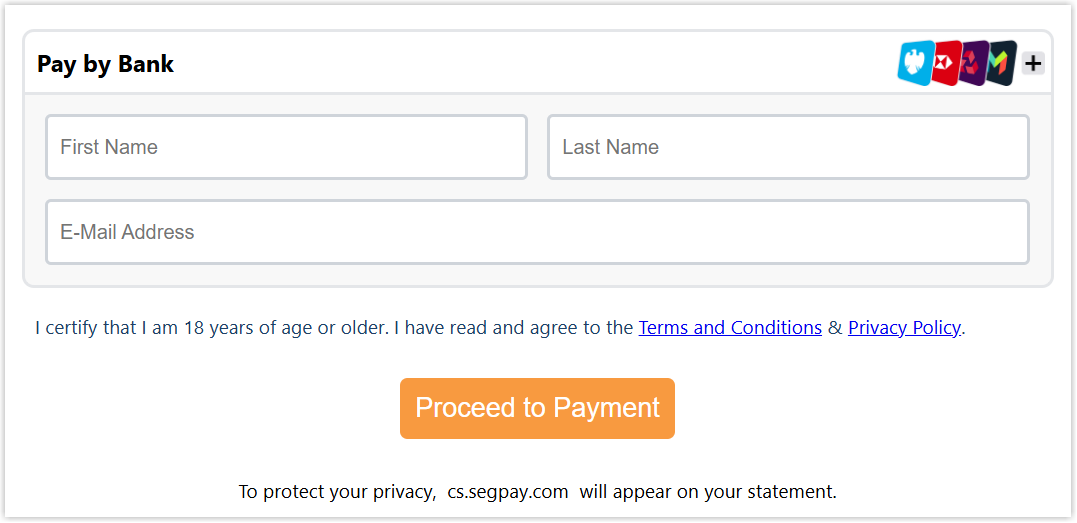
Enters their first name, last name, and email address, then clicks Proceed to Payment.
-
Clicks Continue in the message explaining that they'll be redirected to their bank.
-
Selects or searches for their bank and clicks Go to bank. The banks listed depend on the selected country.
-
Scans the QR code with their banking app or clicks the link to log in through their browser.
-
Logs in to their bank and approves the payment.
If the payment fails, the consumer returns to your pay page and sees a decline message.
-
Views a receipt page confirming the purchase and receives a transaction confirmation email.
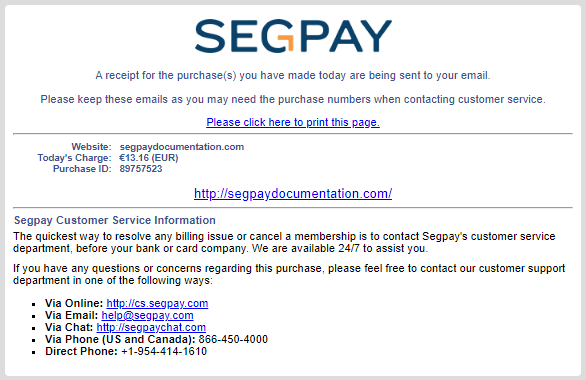
Consumer Portal transaction view
Consumers can visit the Segpay Consumer Portal to search for Pay by Bank purchases and view transaction details.
Consumers cannot update payment information through the Consumer Portal.
To search for a Pay by Bank purchase:
-
Go to https://cs.segpay.com/.
-
Enter any two of the following: Purchase ID, IBAN, or email address.
-
Click Look Up My Purchase.
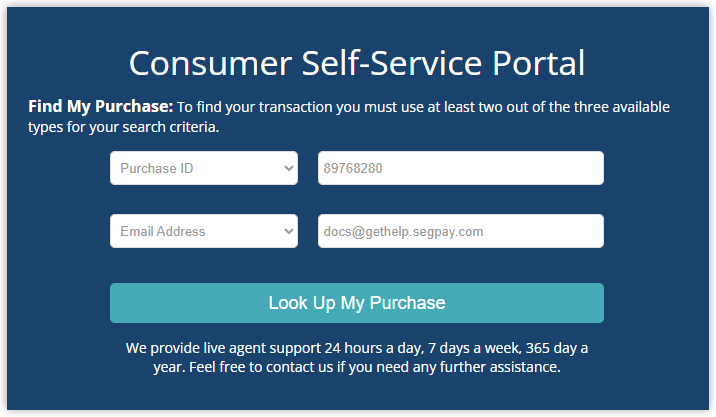
To view transaction details:
-
In the search results, click the eye icon in the Actions column.

-
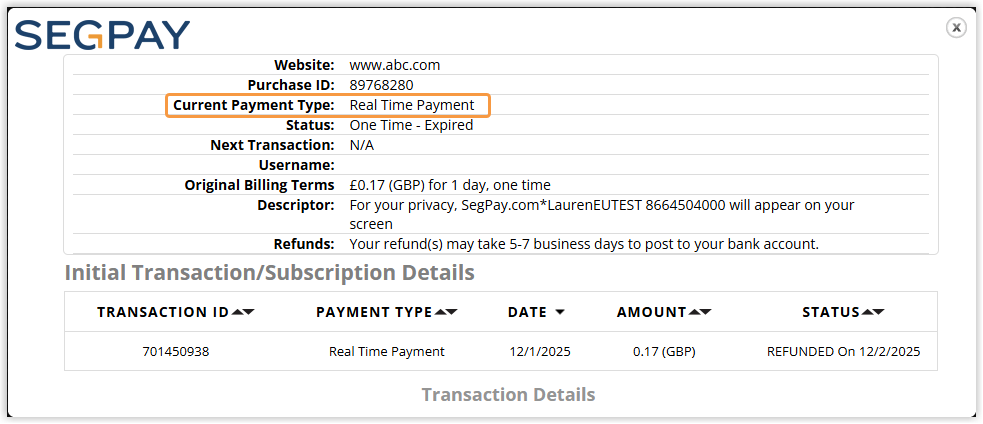
View the transaction details in the pop-up window. The Current Payment Type for Pay by Bank transactions is Real Time Payment.