 Search Tips
One-Click Web Service
The One-Click Web Service enables merchants to process payments in the background so consumers stay on the merchant’s website during checkout. Instead of being redirected to Segpay’s payment page, consumers can complete follow-up purchases with a single click, using card details already stored on file from an earlier transaction.
-
Dynamic Pricing: A final price is calculated within a predefined minimum and maximum pricing range and then sent to Segpay.
-
Static Pricing: A fixed price is charged using an existing static price point (for example, a one-time or digital purchase).
Use this feature to streamline checkout, improve conversion rates, and keep consumers on your site while Segpay securely processes the payment in the background.
Prerequisites
Before you can start using the One-Click Web Service, contact techsupport@segpay.com related to the following requirements:
| Requirement | Purpose |
|---|---|
| Whitelist your IP Addresses | Provide a complete list of your server IP addresses, which must be whitelisted to allow payment processing directly from your site. |
| Compliance Approval | If you plan to use Dynamic Pricing, you must obtain approval from Segpay's Compliance team. |
Configure Packages & Price Points
Dynamic Pricing
-
Obtain Compliance approval for Dynamic Pricing from Segpay’s Compliance team.
-
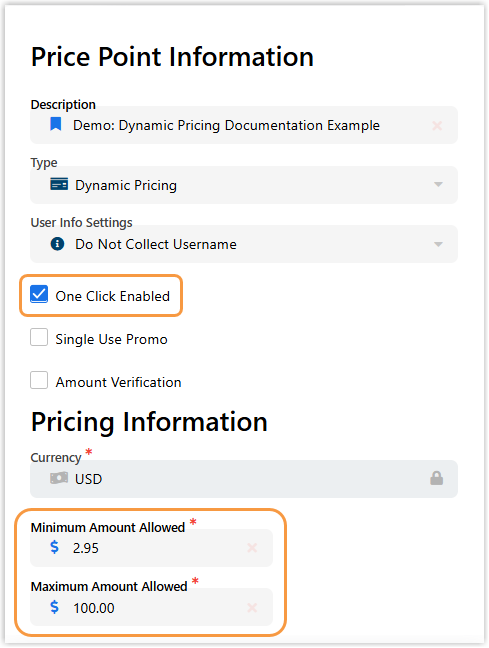
After approval, Segpay creates a Dynamic Pricing price point for you, with One-Click enabled.
-
Provide a minimum and maximum price range for the price point; this range will be used to validate the dynamic amounts you send.
-
In the Merchant Portal, verify the Dynamic price point configuration for the relevant package.
Each package can support one Dynamic Price point only.
Static Pricing
-
In the Segpay Merchant Portal, go to My Websites > Price Points.
-
Create or edit static price points for your one-time or digital purchases.
-
Select One-Click Enabled for each price point that should support One-Click.
-
Associate these static price points with the appropriate package; a package can include multiple static price points.
Create Dynamic Pricing Web Service Request
Use the dynamic pricing base url (endpoint) for dynamic one-click web service requests:
Dynamic Pricing Base URL (Endpoint)
https://service.segpay.com/OneClickSales.asmx/SalesServiceDynamic?Required Parameters for Dynamic Pricing
Add the following parameters to the base URL in your request:
| Parameter | Description | Example |
|---|---|---|
eticketid
|
Combined Package ID (XXXXXX) and Price Point ID (YYYYY), in the format XXXXXX:YYYYY |
206032:35170
|
amount
|
Final amount to charge the consumer, within the predefined min/max range | 25.95
|
dynamicdesc
|
Description of the transaction displayed on the payment page | 50 Tokens Plus 1 Month
|
dynamicpricingid
|
Pricing GUID returned from an API response for the Dynamic Pricing price point | 8fab361c-9640-456e-9443-a53dc0ab222e
|
octoken
|
Purchase ID of the original sale used for One-Click (tells system which card to bill) | 26346680
|
-
The amount you send must be within the configured minimum and maximum range for the Dynamic price point.
-
Only credit card payments are supported with Dynamic Pricing.
-
You can send additional system and user-defined variables as outlined in Segpay’s Processing API for Merchants, in the section “Pre-Populate Fields or Request Data.”
Example Dynamic Web Service Request
The following example shows a Dynamic Pricing request with the required parameters appended to the Dynamic base URL:
-
eticketid=122903:9689 -
amount=25.95 -
dynamicdesc=50+Tokens+Plus+1+Month -
dynamicpricingid=<Pricing GUID from API response> -
OCToken=26346680
Present this as a single query string in your implementation environment as shown in the example
Example of Dynamic Pricing URL using Required Parameters
https://service.segpay.com/OneClickSales.asmx/SalesServiceDynamic?eticketid=xxxxxx:xxxx&amount=25.95&dynamicdesc=50+Tokens+Plus+1+Month&dynamicpricingid=8fab361c-9640-456e-9443-a53dc0ab222e&OCToken=26346680Create Static Pricing Web Service Request
Use the static pricing base url (endpoint) for static one-click web service requests:
Required Parameters for Static Pricing
Add the following parameters to the base URL in your request:
| Parameter | Description | Example |
|---|---|---|
eticketid
|
Combined Package ID (XXXXXX) and Price Point ID (YYYYY) | 122905:9699
|
OCToken
|
Purchase ID of the original sale (original transaction you are rebilling) | 26346680
|
Static One-Click requests do not require the dynamicpricingid or dynamicdesc parameters.
Example Static Web Service Request
The following example shows a static One-Click request with required parameters appended to the static endpoint:
-
eticketid=122905:9699 -
OCToken=26346680
Static
https://service.segpay.com/OneClickSales.asmx/SalesService?eticketid=xxxxxx:xxxx&OCToken=26346680Troubleshooting
This section summarizes known errors and constraints described in the document and how to interpret them.
Dynamic Pricing Errors
When a Dynamic Pricing request is sent incorrectly, the system can return messages such as:
| Error Message | Possible Cause |
|---|---|
Dynamic Pricing No amount passed
|
The amount parameter was not included in the request. |
Transaction Amount does not match what was passed
|
The transaction amount does not match the value passed in the request. |
Dynamic pricing variables not included in URL
|
Required Dynamic Pricing parameters were missing from the URL. |
What to check:
-
Ensure the amount parameter is present and within the configured price range.
-
Confirm that all required Dynamic Pricing parameters (eticketid, amount, dynamicdesc, dynamicpricingid, OCToken) are included and correctly formatted.
Static Pricing Errors
The following errors can be returned when a static One-Click request is sent incorrectly.
| Error Message | Description |
|---|---|
Invalid One-Click Token (ERR301)
|
An invalid OCToken value was passed in. |
Invalid PackageID/Price Option
|
An invalid eticketid value was passed in. |
Invalid PackageID
|
The |
What to check:
-
For Invalid One-Click Token (ERR301): Confirm that the OCToken is the correct Purchase ID from a valid, previous sale.
-
For Invalid PackageID/Price Option: Verify that eticketid combines a valid package ID and price point ID in the correct format (e.g., XXXXXX:YYYYY).
-
For Invalid PackageID: Confirm that the package associated with the eticketid is in Approved status in the Merchant Portal.